Features
Everything required to sell licensed software.
From the key minted on purchase to the frozen API your deployed software depends on — a complete, HPOS-native licensing system. Here is what's inside.
Selling & licensing
Turn any product into a license.
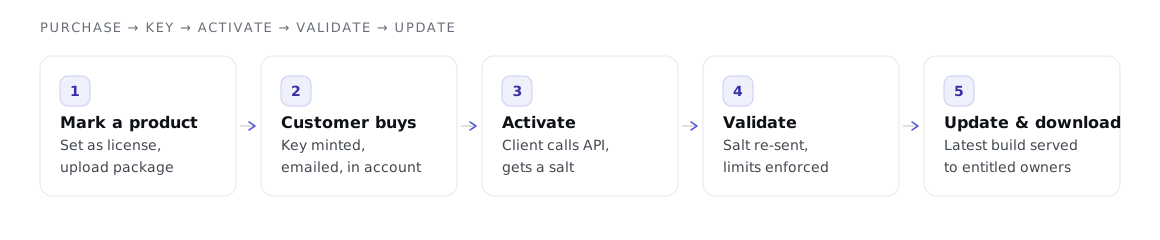
Mark a WooCommerce product as a license, set how many sites it may run on, and upload the package. The rest is automatic.
Automatic license keys
A key is minted for every downloadable item the moment an order completes — emailed to the customer and shown in My Account. A refund inactivates it; deleting the order item deletes it.
Product version management
Upload new versions from the product editor. Each is stored with a version-history record (requires/tested, changelog, major flag), so the updater can serve the latest build.
Secure, gated downloads
Packages live under a deny-all uploads directory and are served only to a logged-in owner with an active license, through a path-traversal-safe resolver.
The APIs your software uses
A frozen contract your deployed software can trust.
The customer's software talks to the store to activate, validate, check for updates and download. Slugs, parameters, response shapes and error codes never change.
License activation API
Activates a key for a site and returns a per-activation salt, reporting activation and validation state through stable error codes (the frozen 20000–20101 range).
Software update API
Single and bulk update checks, plugin-information responses, and the latest-version binary download. Note: its error response is serialize()-encoded, not JSON.
For your customers and you
Manage licenses without leaving WooCommerce.
My Account → Licenses
Customers see each license key, the latest available version, “X of Y activations”, the expiry date, a download link, and every site activation — with a remove link.
Activation management
Customers remove their own site activations; the remove link carries a sacred per-activation nonce verified server-side.
Admin screens
Review every activation and license-owning customer under WooCommerce → Easy License Manager: Activations, Customers (with per-customer license info) and Settings.
Subscriptions
License status that follows the subscription.
When a subscription changes, the matching license keeps pace automatically — no manual work, no querying a subscription engine from the UI.
An active subscription keeps the license active.
On-hold, expired or cancelled → the license expires.
The next-payment date drives the license expiration date.
“Needs payment” inactivates the license.
For developers
Query and extend, four ways.
A read-only query API over four channels — all answering identically from one redacting source of truth — plus neutral hooks and a pluggable subscription provider to extend behaviour without forking.
Trust & safety
Secure and safe by default.
Strict output redaction
The activation salt is never exposed; the license key is shown only to its owner or a capability holder.
Application Passwords
Remote REST and MCP access uses standard WordPress Application Passwords — no separate auth scheme.
Privacy-first
The plugin makes no external calls. Activation and update requests are made to the store, by the customer's software.
HPOS-native
Built on the WC_Order API throughout, so classic and High-Performance Order Storage both work.
Idempotent installer
Tables are created on activation and never dropped or altered if they already exist.
Opt-in Danger Zone
Uninstalling deletes nothing by default; total removal requires ticking the box and typing DELETE.
Start selling licenses with confidence.
Every license includes a 30-day money-back guarantee.